
You’ve got a backlink list, a prospecting spreadsheet, or a client dashboard that needs domain metrics.
Right now you’re probably doing it manually — open a tool, paste a URL, read the number, move on. That works for five domains. Falls apart at five hundred.
The Moz API handles all of it in code. This guide walks through auth setup, working examples in three languages, bulk request handling, error fixes, and caching strategy.
What the Moz API Actually Returns
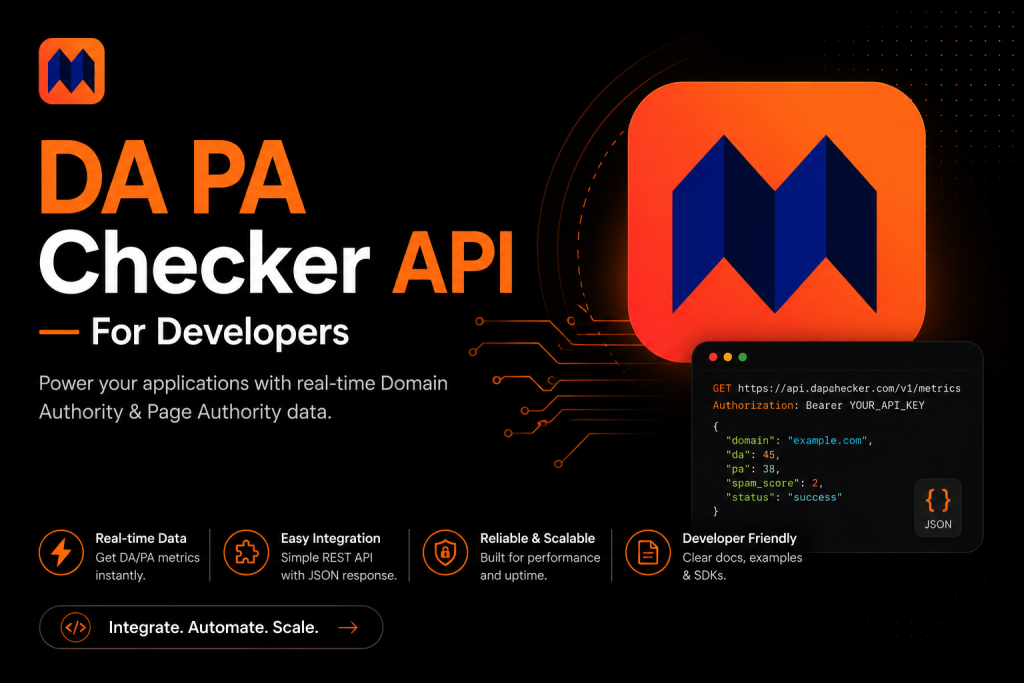
The Moz Links API returns URL-level metrics for whatever domain or page you throw at it. Know what’s in the response before you write anything. The fields you’ll actually use:
| Field | Type | Description |
| domain_authority | Float | DA score (1–100) |
| page_authority | Float | PA for the exact URL you checked — not the root domain, the actual page (1–100) |
| spam_score | Float | Risk percentage (0–100%) |
| root_domains_to_root_domain | Integer | Count of unique domains sending backlinks to this site |
| external_links | Integer | All external links pointing at the domain, counted in full |
| links_to_subdomain | Integer | Backlinks that target the subdomain rather than the root domain |
DA and PA get most of the attention, but don’t drop Spam Score from your response. If you’re vetting domains for outreach or building a backlink audit tool, that number matters just as much.
Moz refreshes its index about once a month. Whatever you pull today is last month’s data. Build your caching and TTL logic around that — daily API calls for the same domain waste quota.
Getting Your Moz API Keys
You need two things: an Access ID and a Secret Key. Here’s how to grab them:
- Head to moz.com and sign up for a free account if you haven’t already.
- Go to moz.com/products/api/keys — either through account settings or directly.
- Generate a new key. You’ll get two values: an Access ID (it starts with ‘mozscape-’) and a Secret Key.
- Copy both right away. The Secret Key disappears after that screen — there’s no way to retrieve it again.
- Wait 20 minutes before you test. New keys take time to roll out across Moz’s servers. If everything returns zeros right after setup, that’s the reason — not a bug in your code.
Free plan: 10,000 rows a month. One URL = 1 row. Batch of 10 URLs = 10 rows. Fine for side projects and internal tooling. Anything production-scale needs a paid tier.
Authentication — How the Moz API Works
Moz uses HTTP Basic Auth. Access ID is the username, Secret Key is the password. Combine them, Base64-encode, drop into the Authorization header. That’s the whole flow.
Send your requests to this endpoint:
| https://lsapi.seomoz.com/v2/url_metrics |
POST request, JSON body, list of target URLs. Results come back in the same order. No OAuth, no token juggling, no refresh flows — just credentials in the header and you’re done.
The one thing you have to get exactly right is the header format:
| Authorization: Basic BASE64(access_id:secret_key) |
Most HTTP libraries encode this for you when you pass auth credentials. If you’re building the header by hand, encode the full ‘access_id:secret_key’ string — not the two parts separately.
Code Examples — Python, PHP, and JavaScript
Python Example
The requests library keeps this tight. Run pip install requests if you’re not already using it.
| import requests import json ACCESS_ID = ‘mozscape-xxxxxxxxxx’ # your Access ID SECRET_KEY = ‘xxxxxxxxxxxxxxxxxx’ # your Secret Key url = ‘https://lsapi.seomoz.com/v2/url_metrics’ payload = { “targets”: [ “example.com”, “anothersite.org” ] } response = requests.post( url, auth=(ACCESS_ID, SECRET_KEY), json=payload ) data = response.json() for result in data.get(‘results’, []): print(f”Domain: {result.get(‘page’)}”) print(f”DA: {result.get(‘domain_authority’)}”) print(f”PA: {result.get(‘page_authority’)}”) print(f”Spam: {result.get(‘spam_score’)}”) print(‘—‘) |
Passing auth=(ACCESS_ID, SECRET_KEY) lets requests handle the Base64 encoding on its own. No manual header construction needed.
PHP Example
cURL is the standard approach in PHP. Straightforward setup, no extra packages.
| <?php $accessId = ‘mozscape-xxxxxxxxxx’; $secretKey = ‘xxxxxxxxxxxxxxxxxx’; $endpoint = ‘https://lsapi.seomoz.com/v2/url_metrics’; $payload = json_encode([ ‘targets’ => [‘example.com’, ‘anothersite.org’] ]); $ch = curl_init($endpoint); curl_setopt($ch, CURLOPT_RETURNTRANSFER, true); curl_setopt($ch, CURLOPT_POST, true); curl_setopt($ch, CURLOPT_POSTFIELDS, $payload); curl_setopt($ch, CURLOPT_USERPWD, “$accessId:$secretKey”); curl_setopt($ch, CURLOPT_HTTPHEADER, [ ‘Content-Type: application/json’, ‘Accept: application/json’ ]); $response = curl_exec($ch); $data = json_decode($response, true); curl_close($ch); foreach ($data[‘results’] as $result) { echo ‘Domain: ‘ . $result[‘page’] . PHP_EOL; echo ‘DA: ‘ . $result[‘domain_authority’] . PHP_EOL; echo ‘PA: ‘ . $result[‘page_authority’] . PHP_EOL; echo ‘Spam: ‘ . $result[‘spam_score’] . PHP_EOL; echo ‘—‘ . PHP_EOL; } |
CURLOPT_USERPWD takes ‘username:password’ as a string and handles the encoding. Don’t build the Authorization header yourself here — cURL covers it.
JavaScript (Node.js) Example
Node 18+ ships with fetch built in. Nothing extra to install.
| const ACCESS_ID = ‘mozscape-xxxxxxxxxx’; const SECRET_KEY = ‘xxxxxxxxxxxxxxxxxx’; const credentials = Buffer.from(`${ACCESS_ID}:${SECRET_KEY}`).toString(‘base64’); const response = await fetch(‘https://lsapi.seomoz.com/v2/url_metrics’, { method: ‘POST’, headers: { ‘Authorization’: `Basic ${credentials}`, ‘Content-Type’: ‘application/json’, }, body: JSON.stringify({ targets: [‘example.com’, ‘anothersite.org’] }) }); const data = await response.json(); for (const result of data.results) { console.log(`Domain: ${result.page}`); console.log(`DA: ${result.domain_authority}`); console.log(`PA: ${result.page_authority}`); console.log(`Spam: ${result.spam_score}`); console.log(‘—‘); } |
Keep these calls on your backend. If your Access ID or Secret Key shows up in frontend JavaScript, anyone with dev tools open can pull them. Use a serverless function or a proxy endpoint — credentials never touch the client.
Handling Bulk Requests the Right Way
The API takes up to 50 URLs per POST. Got 500 domains? Split the list and loop. There’s no shortcut around the 50-target cap.
Batch in Groups of 50
Chunk your list into groups of 50, fire each as a separate request, collect the results. Sending more than 50 in one call returns an error, not partial data.
| # Python batching example def chunk_list(lst, size): for i in range(0, len(lst), size): yield lst[i:i + size] all_urls = […] # your full list of domains results = [] for batch in chunk_list(all_urls, 50): resp = requests.post(url, auth=(ACCESS_ID, SECRET_KEY), json={‘targets’: batch}) results.extend(resp.json().get(‘results’, [])) |
Respect Rate Limits
Free plan: 10 requests per second. Hit a 429 and back off — wait 1 second, then 2, then 4 on consecutive failures. A time.sleep(1) between batches keeps you under the limit on free accounts.
Cache What You Can
DA and PA update monthly. Calling the API for the same domain every few hours burns quota for no reason. Cache results with a 24–48 hour TTL. On bigger projects this cuts row usage by more than half.
API Plans and Pricing
These numbers shift, so confirm at moz.com before committing to a plan. Here’s the rough shape of what’s available:
| Plan | Rows/Month | Price | Best For |
| Free | 10,000 | $0 | Testing & small projects |
| Starter | 100,000 | ~$99/mo | Freelancers & bloggers |
| Medium | 500,000 | ~$249/mo | Agencies & SaaS tools |
| Large | 2,000,000+ | Custom | Enterprise platforms |
The free tier holds up for small projects and internal tools. Once you’re running automated audits or powering a client-facing tool, free won’t last long. Starter or above is where production work lives.
Watch how rows get counted. Each metric field per URL adds to the total — DA, PA, and Spam Score for 10 URLs costs 30 rows, not 10. Read the row-counting docs before you pick a plan.
Common Errors and How to Fix Them
401 Unauthorized
Wrong credentials or a bad header format. Check your Access ID starts with ‘mozscape-’. Look for trailing spaces in the Secret Key. If you’re encoding manually, make sure you’re encoding the full combined string, not each part on its own.
New Keys Returning Zeros
New keys take around 20 minutes to go live across Moz’s infrastructure. All zeros right after generation? Just wait. Nothing wrong with the code — the key hasn’t fully propagated yet.
429 Too Many Requests
You’re over the rate limit. Drop a delay between requests — one second per call works on free plans. For retries, use exponential backoff: 1s, 2s, 4s. A tight loop with no delay will keep hitting 429.
Results Out of Order
Results come back in the same order as the targets you sent. If you’re processing batches asynchronously and not tracking order, you’ll mix up which result belongs to which domain. Index your batches, match by position.
Empty or Null Values
Not every domain comes back with data. New sites, private IPs, and pages Moz hasn’t indexed yet will return null for DA or PA. Always null-check before using these values in math. Never assume all fields are present.
Alternative APIs Worth Knowing
DA and PA are Moz’s own metrics — you can only get them from Moz. That said, other providers offer their own versions of domain authority. Here’s what’s actually out there:
- Ahrefs API — returns Domain Rating (DR) and URL Rating (UR), different algorithm from Moz but widely respected. Requires a paid Ahrefs subscription.
- SEMrush API — returns Authority Score, plus traffic estimates, keyword data, and backlink counts. More expensive but broader data coverage.
- Majestic API — Trust Flow and Citation Flow metrics. Older methodology but still used in some enterprise SEO stacks.
- DataForSEO — reseller API that aggregates data from multiple sources including Moz. Useful if you want DA, DR, and traffic data from one endpoint.
- RapidAPI marketplace — several third-party wrappers around Moz data exist here. Cheaper per call than direct Moz access but you’re relying on a middleman.
If the actual Moz DA and PA numbers are what you need, go direct. Third-party resellers add latency, can fall out of sync with Moz’s index, and give you one more thing that can break in production.
Conclusion on DA PA Checker API
The Moz API is straightforward once you get past the authentication setup. Basic Auth, a POST request with a targets array, and you’re pulling DA, PA, and Spam Score for any domain programmatically.
Start with the free plan. Cache your results. Batch in groups of 50. Keep credentials server-side. Those four habits will take you from a working prototype to a production-ready integration without burning through your quota or leaking keys.
The code examples in this guide give you a working starting point in Python, PHP, and JavaScript. From there, it’s just a matter of plugging the results into whatever you’re building.
FAQ’s
Is the Moz API free to use?
Yes, up to 10,000 rows per month on the free plan — no credit card needed. That covers a decent amount of testing and small-project usage. Once you need more volume or faster rate limits, paid plans start around $99/month. Check moz.com for current pricing since tiers change.
Can I check DA and PA without using the Moz API directly?
Yes. Third-party services like DataForSEO, RapidAPI wrappers, and tools like dapachecker.org offer their own APIs that sit on top of Moz data. These can be cheaper per call at low volume. The tradeoff is data freshness and reliability — you’re dependent on how often the middleman syncs with Moz’s actual index.
How many URLs can I send in a single API request?
Up to 50 URLs per POST request. For larger lists, split into batches of 50 and loop through them. The API doesn’t accept more than 50 targets in a single call. Trying to send 200 URLs in one request will return an error, not partial results.
Does the Moz API return real-time DA scores?
No. Moz updates its link index roughly once a month. The DA and PA scores you get from the API reflect that last crawl cycle, not live changes. If you added 50 backlinks last week, they won’t show in the API response until after Moz’s next full index update.
What's the difference between checking a domain vs. a full URL?
When you pass ‘example.com’ to the API, you get the domain-level DA. When you pass ‘example.com/specific-page’, you get the PA for that specific page plus the domain’s DA. For backlink prospecting, check the exact page you want a link from — its PA can be very different from the root domain’s DA.
How should I store API results to avoid burning through my row limit?
Cache results in a database with a timestamp. DA and PA change monthly, so any result under 30 days old is still accurate enough for most use cases. Before making an API call, check your cache first. On high-volume projects, this can cut your row consumption by 80–90% and stretch a free plan much further.
Is it safe to call the Moz API from a frontend JavaScript app?
No. Never put your Access ID or Secret Key in client-side code. They’ll be visible to anyone who opens developer tools. Build a small backend endpoint — a serverless function works fine — that receives the URL from your frontend, makes the Moz API call server-side, and returns the result. Your credentials stay protected.

Writes about SEO, link building and domain authority.