
Internal Linking Strategy to Boost Page Authority Across Your Site
Most sites leak page authority every day and never notice. Pages that earned real backlinks over months of content work end up with their link equity pooled on the homepage and three popular posts — while the service pages, comparison articles, and cluster content that actually need authority to rank sit disconnected, weak, and invisible.
Internal linking fixes this without a single new backlink. The authority is already sitting on your domain. An internal linking strategy channels it where it needs to go — from your high-PA pages to the ones you’re actually trying to rank. Done right, it lifts individual page authority, improves crawl efficiency, and builds the topical depth Google uses to trust your content.
Here’s how to build it from the ground up.
What Internal Links Actually Do to Page Authority
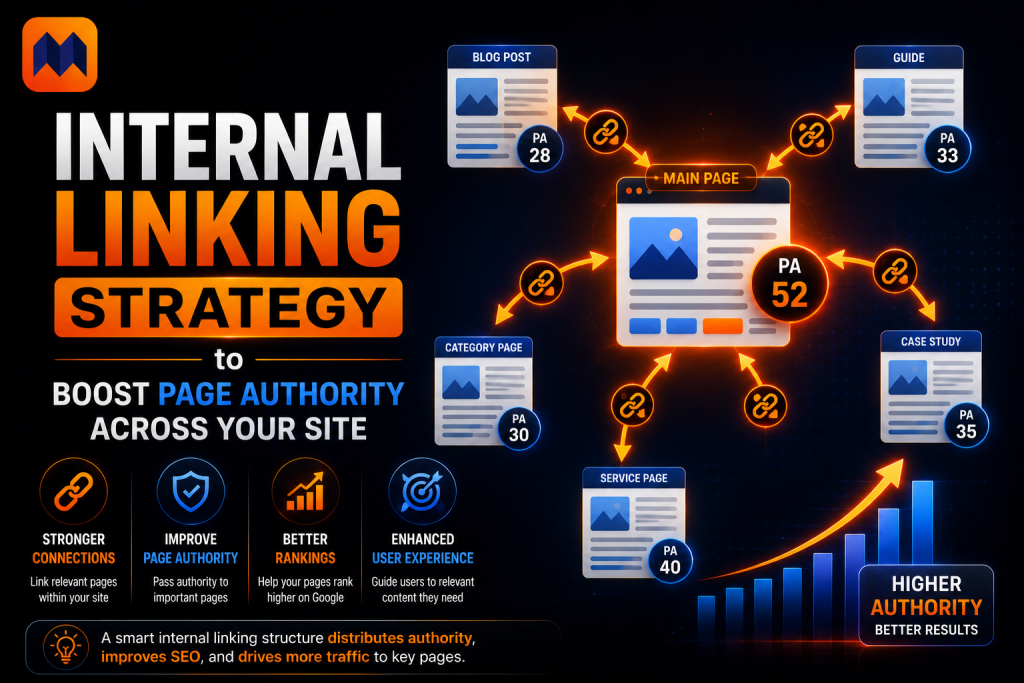
Before building a strategy, you need to understand the mechanism. Internal links don’t just help users navigate — they pass link equity from the linking page to the destination. That’s the authority transfer that directly moves Page Authority scores.
Every external backlink your site earns adds authority to the page it points at. Through internal links, you can move that authority to other pages on your domain. A blog post that earned 40 referring domains over two years carries real PA. When it links to your target page, a portion of that PA transfers — no new external link required.
Google confirmed this directly. Googlebot uses internal links to discover URLs, map the relationships between pages, and judge which pages the site treats as important. The more internal links a page collects from strong pages, the more authority it accumulates — independent of any new external backlinks.
The practical implication: your internal link architecture is a direct lever on every page’s PA. Two pages on the same domain, with identical external backlink counts, can have very different Page Authority scores based entirely on how well other pages link to them internally.
Build Your Site Around a Pillar-Cluster Architecture
The most reliable architecture for distributing page authority in 2025–2026 is the pillar-cluster model. At this point it’s the standard for any site building topical authority — not a nice-to-have.
The structure works like this:
A pillar page covers a broad topic from top to bottom — a 2,000–5,000 word resource that touches every major subtopic and links out to each supporting piece. It’s the authority anchor for that subject on your domain.
Cluster pages each explore a specific subtopic in depth. They link back to the pillar, link to each other where relevant, and receive internal links from the pillar. This creates a bi-directional linking loop that concentrates authority on the pillar page while signaling to Google that the cluster is a coherent body of work — not scattered posts.
The PA effect: Broad pillar pages attract more external backlinks than narrow posts. Those backlinks raise the pillar’s PA. Internal links then carry that authority down into the cluster. Every supporting page benefits from what the pillar earned — even pages that haven’t independently attracted a single link.
Practical setup:
- Identify your 3–5 most important topic areas
- Write or designate one comprehensive pillar page per topic
- Map every existing article under the relevant pillar
- Add links from each cluster page to its pillar, and from the pillar down to each cluster page
- Link laterally between cluster pages that share subtopic relevance
A site with 80 blog posts and no cluster structure has 80 weak, isolated pages competing for attention. That same content organized into 5 clusters has 5 strong pillar pages with concentrated authority — and 75 supporting pages that inherit from that strength.
The Striking Distance Tactic — Start With What Can Win Now
Once your cluster architecture is in place, the highest-leverage internal linking move is targeting your striking distance pages first.
Striking distance pages are those currently ranking in positions 4–12 for a target keyword. They’re indexed, trusted, and close — one authority boost away from breaking into the top 3. A page ranking at position 7 that gets 5 strategic internal links from high-PA pages on your domain often moves to positions 3–5 within 4–8 weeks. No new content, no new backlinks.
How to find your striking distance pages:
Open Google Search Console and go to the Performance report. Filter by position: set minimum to 4 and maximum to 12. Sort by impressions descending. Any page showing significant impressions in this range is a striking distance candidate — it has real search demand and Google is already considering it, but it hasn’t earned enough authority to break higher.
How to boost them:
Pull your 10–15 highest-PA pages using Ahrefs Site Explorer or Moz’s Link Explorer. For each striking distance page, find 3–5 high-PA pages on your site that are topically related. Insert a contextual internal link from each of those pages to the striking distance page — using keyword-relevant anchor text that reflects the target page’s primary query.
This is the most predictable traffic lever in internal linking. You’re not guessing what might work — you’re taking a page Google already trusts enough to rank in the top 12 and giving it the authority push to move higher.
Anchor Text — The Signal Most Sites Get Wrong
Anchor text is the relevance signal most sites treat as an afterthought. It tells Google what the destination page covers — not just where the link goes. Most sites either default to generic labels like ‘click here’ or swing the other way and stuff every internal link with the same exact-match keyword phrase. Both approaches hurt.
Based on 2026 practitioner data, the effective anchor text split for internal links targeting a single page looks like this:
- Exact-match anchor text (your precise target keyword): 15–25% of links pointing at any given page
- Partial-match (contains the keyword but with varied phrasing): 30–40%
- Semantic variants (synonyms, related phrases, supporting terms): 25–35%
- Branded or navigational anchors: the remainder
The reasoning: Google’s algorithm interprets anchor text as a topical signal. If 80% of internal links to a page use the exact same anchor, it looks manipulative — the same footprint that causes issues with external link profiles. Varied, descriptive anchors that naturally describe the destination’s content are both more useful to readers and more trusted by Google.
What to avoid:
- Generic anchors: “click here,” “read this,” “learn more” — zero topical signal
- Naked URLs as anchor text — machine-readable but user-hostile
- The same exact-match phrase for every internal link to the same page
What works: Anchor text that reads naturally and tells both the reader and Google what they’ll land on. ‘Our complete guide to bathroom tile ideas’, ‘small bathroom remodel on a budget’, and ‘affordable tile options for small spaces’ are three different anchors pointing at the same page — each reinforcing a different angle of its topical relevance.
Fix Orphan Pages Before Adding New Links
No internal linking strategy works if you have orphan pages — pages with zero internal links pointing to them. Crawlers move through a site by following links. A page with no internal links only gets found if it’s in your XML sitemap, and even then, it receives no equity from the rest of the domain.
How many orphan pages does a typical site have? More than most site owners expect. An SEO case study on a 200-page site found 47 orphan pages — nearly a quarter of the entire content library. Those pages showed up in Search Console impressions, but ranked poorly because the rest of the site treated them as if they didn’t exist.
Where to find them:
- Run Screaming Frog across your domain. Export all internal pages and cross-reference against the Internal Links report to surface any pages with zero inbound internal links.
- In Search Console, look for pages with decent impression counts but little or no click traffic — these are often pages Google is trying to rank but your own site hasn’t linked to properly. Ahrefs Site Audit also flags orphan pages directly in its site structure report.
- Ahrefs Site Audit flags orphan pages directly in the site structure report.
How to fix them:
For each orphan page, find 2–3 topically related pages on your site that are well-linked and add a contextual internal link from those pages to the orphan. Prioritize orphan pages that are already earning impressions in Search Console — these are pages Google has indexed and is trying to rank, but which your own site treats as unimportant.
Clearing a backlog of orphan pages consistently produces one of the fastest measurable PA improvements available without any external link building.
Click Depth — Keep Your Best Pages Within 3 Clicks
Click depth is how many clicks it takes to reach a page from your homepage. Google has been direct about this: pages sitting more than 3 clicks away are treated as less important and crawled less often. That structural judgment affects how quickly those pages accumulate authority.
The authority effect is real. A page 5 clicks deep naturally receives fewer internal links — because fewer pages in your site connect to things that hard to reach. It gets crawled less, earns authority slowly, and looks unimportant to Google by virtue of where it sits. A page at 2 clicks inherits structural importance just from its position.
The 3-click target:
- Homepage → Category/Pillar page → Individual article: 2 clicks
- Homepage → Category → Subcategory → Article: 3 clicks — acceptable
- Homepage → Category → Subcategory → Sub-subcategory → Article: 4+ clicks — needs to be fixed
If your most important service pages, money pages, or high-commercial-intent articles are sitting more than 3 clicks from the homepage, bring them closer. Add direct links from your homepage or main pillar pages to these high-value destinations. Even a single shortcut link from a strong page cuts the effective click depth and tells Google the page matters.
How to Run a Quick Internal Link Audit
You don’t need enterprise tools to run an effective internal link audit. Work through this sequence once per quarter:
Step 1 — Orphan page scan. Run Screaming Frog or Ahrefs Site Audit. Pull every page with zero internal inlinks. Any that show impressions in Search Console are your first priority — Google sees them, but your site doesn’t support them.
Step 2 — High-PA page check. In Moz or Ahrefs, pull your top 20 pages by Page Authority. For each one, check what it currently links to internally. Ask: is it pointing authority toward the pages that need it, or toward content that’s already strong?
Step 3 — Striking distance filter. In Search Console, filter pages at positions 4–12 with meaningful impression volume. Cross-reference with your high-PA list from Step 2. For every striking distance page that lacks a high-PA internal link, build that connection now.
Step 4 — Anchor text review. Use Screaming Frog’s anchor text report to check what anchors your pages are receiving internally. Flag any page where more than 40% of internal anchors are identical. Add varied anchor text through new or edited links on related pages.
Step 5 — Click depth check. Run Screaming Frog and review the Crawl Depth column. Any important page at depth 4 or higher needs a shortcut link from a shallower, well-linked page to bring it within the 3-click threshold.
The whole audit takes under 90 minutes and identifies specific, actionable improvements — not vague recommendations.
Common Internal Linking Mistakes That Kill Page Authority
Linking only from new content to new content. Old, well-ranked articles with accumulated PA are your best internal link sources. They have the authority to move. Focusing link placement only in new posts misses the highest-value placement opportunities on your entire site.
Pointing everything at the homepage. Your homepage already has the highest PA on your domain. Internal links to the homepage waste equity on a page that doesn’t need help. Point internal links toward pages that are actually trying to rank for target queries.
Over-relying on navigation and footer links. Sitewide navigation links appear on every page, which means Google distributes their equity across the entire site — and each individual link passes very little. Contextual links within body content pass significantly more authority because they’re editorially placed, topically relevant, and appear within substantive content.
Ignoring link count per page. A page with 200+ outbound links (including navigation, footer, and sidebar) dilutes each link’s equity contribution. Keep total page link count under 150. For body content, 3–5 contextual internal links per 1,000 words is the practical baseline.
Treating internal linking as a one-time setup. Every new piece of content needs 3–5 internal links from existing topically related pages — added to those existing pages, not just from the new post. This is the step most teams skip, and it’s exactly why new content sits weakly ranked for months after publishing.
Conclusion:
Internal linking is the most underused authority lever most sites have. The backlinks that built your domain’s authority are already there — sitting in posts and pages that earned links years ago. An internal linking strategy puts that authority to work for the pages that need it most.
Map your clusters. Find your striking distance pages. Audit your orphan content. Link from your strongest pages to your highest-potential ones. The authority doesn’t need to be built from scratch — it needs to be distributed to where it can actually win.